Continuous control
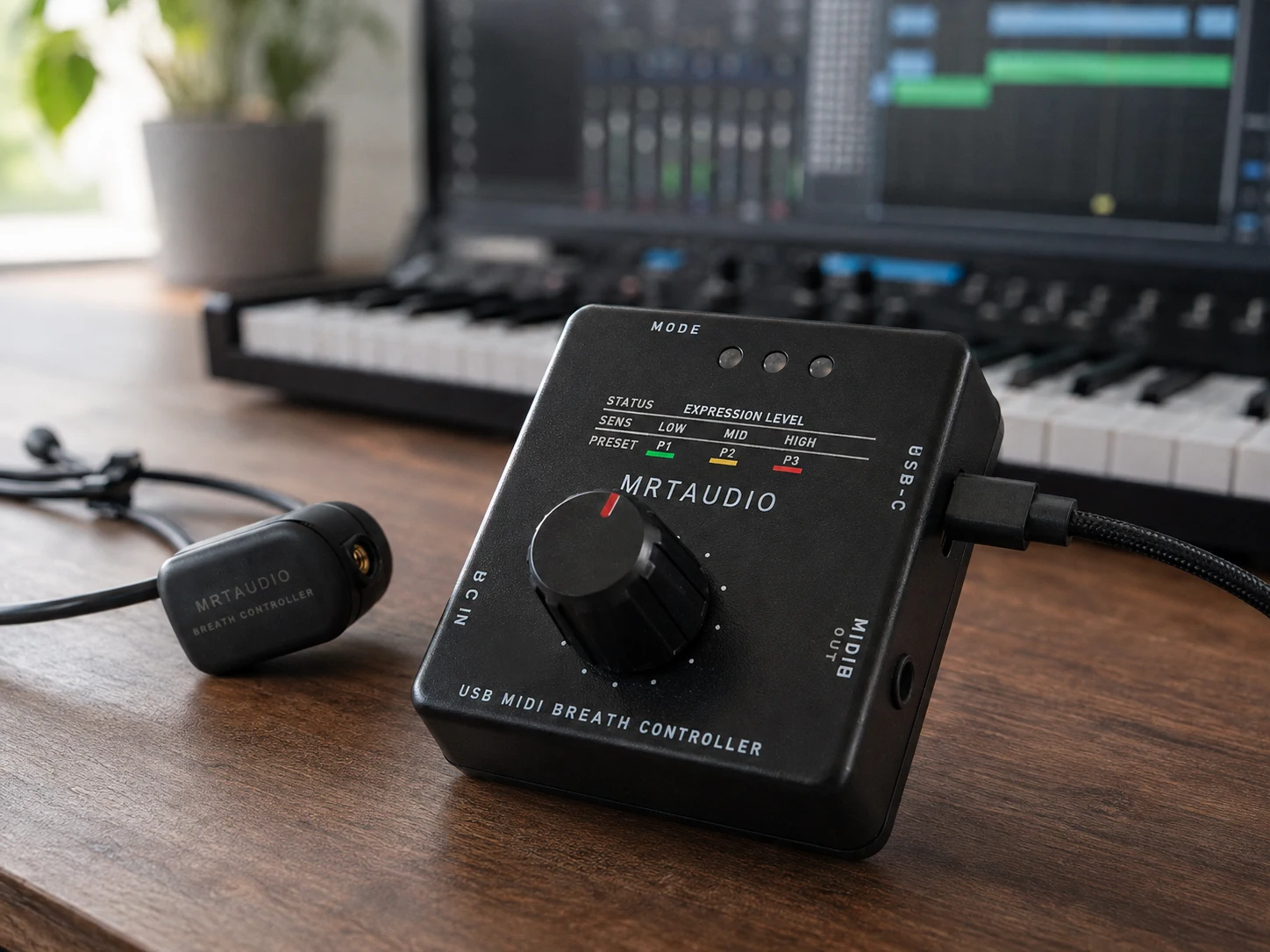
Breath pressure becomes a continuous MIDI value for shaping compatible parameters in real time.
ABOUT MRTAUDIO · SINCE 2011
MRTAUDIO is an independent music-technology developer based in Türkiye. We design hardware, firmware and browser-based tools that turn breath into configurable MIDI control for studio, stage and hardware-instrument workflows.
The 10,000+ delivery figure is based on MRTAUDIO direct-sales and distributor records. It describes cumulative delivery history across earlier and current product generations.
01 · ENGINEERED FOR EXPRESSION
The design goal is simple: preserve small changes in breath while keeping the resting point stable and the response predictable. Sensitivity, range, curve and timing controls are provided so musicians can adapt the controller to the receiving instrument and their own playing style.
Breath pressure becomes a continuous MIDI value for shaping compatible parameters in real time.
Calibration and response controls let the player balance soft detail, available breath range and stage stability.
The headset format keeps both hands on the keyboard, controller or instrument during performance.
02 · BUILT FOR REAL MIDI WORKFLOWS
MRTAUDIO products are designed around the MIDI systems musicians already use. Supported hosts can receive class-compliant USB-MIDI, while the hardware MIDI output can connect to compatible keyboards and sound modules without leaving a computer in the performance path.
STUDIO
Route breath to the MIDI destination expected by the instrument, then save the working setup to the controller.
HARDWARE
Use a supported USB-MIDI host or the 3.5 mm TRS Type A MIDI output with a suitable cable or adapter.
PERFORMANCE
Stored settings remain available after configuration, so the browser does not need to stay open while playing.
03 · TESTED, NOT ASSUMED
A connection is considered useful only when the complete path works: power, host recognition, MIDI routing, the receiving patch and long-session behavior. Manuals state host-dependent requirements, and product development combines bench testing with musician feedback from practical setups.
These independently shared performances document real musical use. They are presented as practical examples, not as formal sponsorship claims.

Contemporary jazz pianist Simon Oslender has shared performances featuring MRTAUDIO breath control alongside a keyboard.
Watch performance
Contemporary jazz pianist Simon Oslender has shared performances featuring MRTAUDIO breath control alongside a keyboard.
Watch performance
Musician Mark Steiner documented his own expressive MIDI performance using an MRTAUDIO controller.
Watch performance04 · ENGINEERING
MRTAUDIO product development is led by Murat Şimşek. Sensor processing, performance firmware, device controls and the Web Configurator are evaluated together so changes can be checked across the full signal path rather than in isolation.
In 2013, American flutist, studio musician and engineer Al Jewer contributed extensive testing and code-development assistance to the work that became MRTAUDIO V2. His musical and technical perspective remains an acknowledged part of that product history.
About Al Jewer05 · PRODUCT DEVELOPMENT
The product line has developed through successive generations, with each stage addressing practical control, connection and performance needs. In Standard, three independent layers can respond to the same breath at once. Three stored presets let you recall different complete setups; layers and presets serve different purposes.
The first MRTAUDIO controller established the core system: converting breath pressure into continuous MIDI control.
The second generation refined response and broadened support for keyboard and studio workflows.
Ribbon control extended the concept beyond breath alone.
Three independent breath layers, stored presets, USB-MIDI, hardware MIDI OUT and browser-based configuration.
A continuing product-development path that combines breath control with a configurable multi-zone touch surface.
06 · CHOOSING YOUR SETUP
Standard sends MIDI control data; it does not make sound by itself. You need a compatible receiving instrument or software and an MRTAUDIO breath headset. Check the connection and MIDI response of your exact setup before choosing a package.
Explore Standard with the compatible headset. Compare its three independent breath layers, stored presets and connection options with your performance needs.
Explore StandardA controller-only order excludes the headset. Choose it only when you already have a compatible MRTAUDIO headset; the store also offers the headset separately.
Compare package optionsUse the manual for the initial connection, calibration and care of removable mouthpiece parts. For an older controller, check its model-specific documentation before changing the setup.
Read the product manuals07 · TECHNICAL RESOURCES
Start with the connection your instrument supports, choose the MIDI message its sound responds to, then calibrate a comfortable breath range. These guides explain each step before you open the configurator.
Product guides, connection details, calibration instructions and maintenance information.
Configure supported MRTAUDIO hardware, save settings and manage firmware in a compatible browser.
Understand USB-MIDI host requirements, separate USB power and the TRS Type A connection to a hardware MIDI input.
Choose a control message the receiving instrument responds to. MIDI channel and sound settings matter as much as the cable.
Establish the resting point and usable range, then refine the response for your playing style.
A sourced overview from early Yamaha controllers to modern USB-MIDI tools.
08 · COMPANY
MRTAUDIO is developed by MRTE Elektronik Müzik Aletleri San. ve Tic. Ltd. Şti., an independent music-technology company in Samsun, Türkiye. Product questions, documentation and support are handled through the contact details below.
For setup advice, tell us your controller model, keyboard or software, connection type and the MIDI message you want to control. This helps us assess the complete setup and point you to the relevant instructions.
Use the USA or Europe guide to compare retailer options, or read the Standard overview in Turkish or Japanese. For delivery to Japan or another Asian destination, confirm availability, shipping and applicable charges with the selected seller before ordering.